
Popup reminders
Pop-up reminders you cannot miss
A Windows toast slides into the corner, waits a few seconds and files itself away. NextUp Alert’s pop-up reminders overlay every window — full-screen apps included — count down live, and stay on screen until you deal with them.
Free · Windows 10 and 11 · Works with Google Calendar or Outlook
Why reminder pop-ups get missed
Most “popup reminders” on Windows are not really pop-ups. They are notifications, and notifications are built to get out of your way.
- They dismiss themselves. A toast waits a few seconds, then slides into the notification centre with everything else you never read.
- They appear in the corner. The one part of the screen you are trained to ignore, at the exact moment you are concentrating on something else.
- Calendar toasts need their app. Google Calendar’s come from a browser tab; Outlook’s come from Outlook. Neither fires with the program closed.
A reminder that matters should behave the other way around: appear where you are looking, and keep standing there until you act.
A pop-up that stays put — and counts down
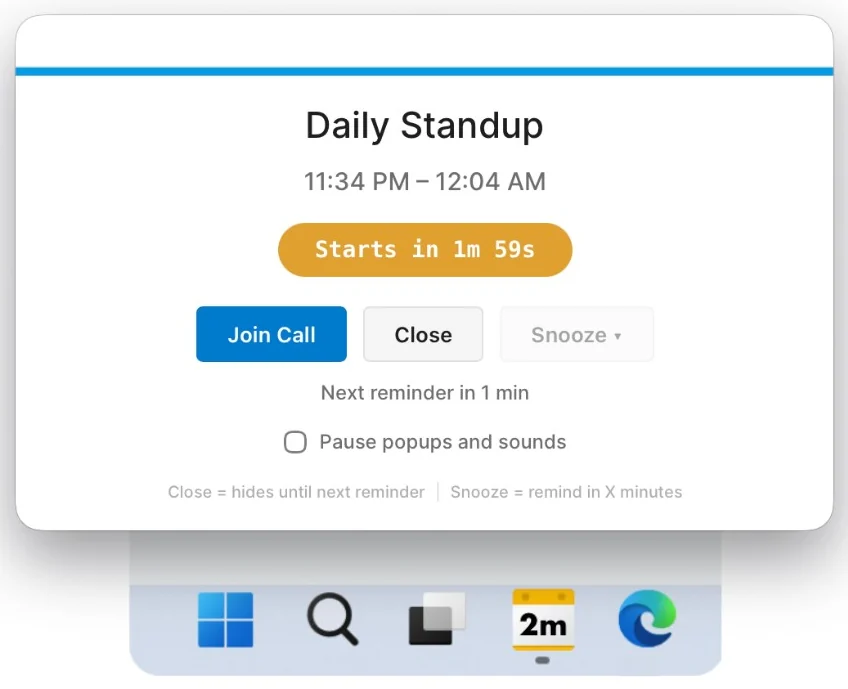
NextUp Alert’s popup overlays whatever you are doing, shows a live countdown rather than a static “in 10 minutes”, and puts the three things you need in reach.
- Overlays every window, including full-screen apps and shared screens
- A live countdown — “Starts in 1m 59s” — that keeps ticking while it waits
- Join opens the Teams, Zoom or Meet link in one click
- Close hides it until the next reminder; Snooze brings it back in a few minutes
- A pause switch for popups and sounds when you are presenting
Pop up as often as you need told
One reminder is a coin toss. NextUp Alert lets each event remind you repeatedly, and each reminder can take a different form.
Up to five per event
From three hours before down to a final ten-second call — you set the times once and they apply to everything.
Before the end, too
Five more reminders before an event ends, so back-to-back meetings stop colliding.
Not only pop-ups
Mix in spoken countdowns, notification sounds or an escalating alarm that rises in volume until dismissed. See all the reminder types.
The countdown underneath
Between pop-ups, the taskbar countdown keeps the time remaining permanently in view.
Works when the calendar’s own app is closed
NextUp Alert is a Windows desktop app, not a browser extension or a tab you have to leave open. It sits in the system tray, starts with Windows, and reads your Google Calendar and Outlook (Microsoft 365) calendars directly — so the pop-ups keep coming with every browser window and Outlook closed, and events that have already synced keep firing even if your connection drops.
Common questions
Do the pop-ups really appear over full-screen apps?
Yes. The popup overlays every other window, including full-screen applications and shared screens. When that is the wrong behaviour — a presentation, a recording — there is a pause switch that silences popups and sounds until you turn it back on.
What is the difference between Close and Snooze?
Close hides the popup until the next scheduled reminder for that event. Snooze brings the same popup back in a few minutes, regardless of what you had scheduled.
Do popup reminders work with the browser closed?
Yes. NextUp Alert talks to Google’s and Microsoft’s calendar services itself, so nothing needs to be open — no browser, no Outlook, no calendar tab. Reminders fire from the app in your system tray.
Can a pop-up make a sound as well?
Yes. Pair it with a notification sound, a spoken countdown — “Event starts in 10 minutes” — or an escalating alarm that keeps rising in volume until you dismiss it, for when you have stepped away from the desk.
Put a pop-up you cannot miss on your next meeting
Free on the Microsoft Store. No account needed.