
ADHD time management
ADHD time management: 10 strategies for the working day
The ADHD time management strategies that hold up best share one idea: stop relying on an internal sense of time and put time somewhere you can see it. Below are ten practical habits for a desk job — how to estimate, plan, start, stop and turn up — with the reasoning behind each. This is a how-to, not a product list; the tools come at the end.
Why ordinary time management advice often misses
Most time management advice assumes you can feel time passing and just need a better system for spending it. Many adults with ADHD describe the opposite: the system is fine, but twenty minutes and an hour feel the same from the inside. Research backs the general point — a 2021 meta-analysis found people with ADHD were, on average, less accurate at judging durations (Marx et al.).
That is why the strategies below lean on what CHADD describes in a webinar on the science of time management as learning to “see” time by externalising it. They are workplace habits, not treatment, and this page is not medical advice — for ADHD itself, talk to a qualified professional.
10 ADHD time management tips that work at a desk
-
Make time visible, all the time
A clock you have to look for is a clock you will not look at. Put the time remaining where your eyes already are — a visual timer on the desk, or a countdown in the taskbar. If you only change one thing, change this.
-
Time it, don’t guess
For recurring things — the morning routine, the commute, a weekly report — time them once and write the number down. Melissa Orlov’s advice in Psychology Today is exactly that, plus a 10–20 percent “fudge factor” on top.
-
Put everything with a time on the calendar
Not just meetings: the time you need to leave, the block for the report, lunch. If it only exists in your head, it is competing with everything else in there.
-
Schedule the stop, not just the start
A calendar entry for 2pm says when to begin. It says nothing about when to stop the thing before it. Set the warning for when you need to start wrapping up — that is the moment that actually matters.
-
Layer your warnings
One reminder fails if it lands while you are deep in something. Two or three — “start wrapping up”, “go now” — give you a gradient instead of a cliff. More on this in getting out of hyperfocus before a meeting.
-
Count transition time as real time
Saving work, finding the link, getting a coffee and switching your head into a different conversation all take minutes. Leave gaps between meetings where you can — CHADD suggests breaks between them and shorter durations.
-
Batch meetings together
One reader in an ADDitude roundup on transitions blocks their calendar so meetings and calls sit together. Fewer switches in a day means fewer chances for one to go wrong.
-
Break big tasks into visible steps
“Write the proposal” has no obvious start and no way to judge progress. Five steps with a rough time each give you both. CHADD lists breaking large projects into steps among its workplace strategies.
-
Log how long things actually take
A week of rough notes — “expenses: 40 minutes, not 10” — corrects your estimates better than any rule of thumb. It is on CHADD’s list too.
-
Cut the noise
When everything pings, nothing gets noticed. Turn off alerts for things that do not need you, so the ones that remain are worth listening to.
Working from home makes time harder to see
An office is full of accidental time cues: people getting up for the meeting, the lunch rush, the lights going off. At home there is just you and the screen, and the day can disappear without a single outside signal. If you work remotely, the strategies above matter more, not less — especially the first one. Some people also use body doubling, working alongside someone else on a video call; CHADD includes it among strategies for time blindness at work. There is more on remote work in ADHD at work.
Where a tool fits
Most of the habits above are free and need nothing but a calendar. Two of them — making time visible and layering your warnings — are much easier with software doing the remembering for you.
That is what we built NextUp Alert for. It is a Windows app that reads your Google or Microsoft calendar and keeps a live countdown to your next meeting in the taskbar, changing colour from green to yellow to red as it gets close. You can stack up to five reminders before a meeting and five before it ends, add a spoken countdown, and join the call with one click. It does not plan your tasks or replace a to-do list.
For the tools themselves:
- ADHD time management tools — tools that make time visible, sorted by the question each one answers.
- ADHD tools for adults — a broader roundup by problem: time, tasks, focus and meetings.
- A visual timer for ADHD on Windows — desk timers, focus timers and the taskbar countdown, compared.
- The time blindness test — measure how far your sense of time drifts before you pick anything.
A day, made visible
The system tray pop-out shows your whole day on a timeline, colour-coded by event, with the next one highlighted. It is strategy three and strategy one in a single glance: everything with a time, and how long until the next one.
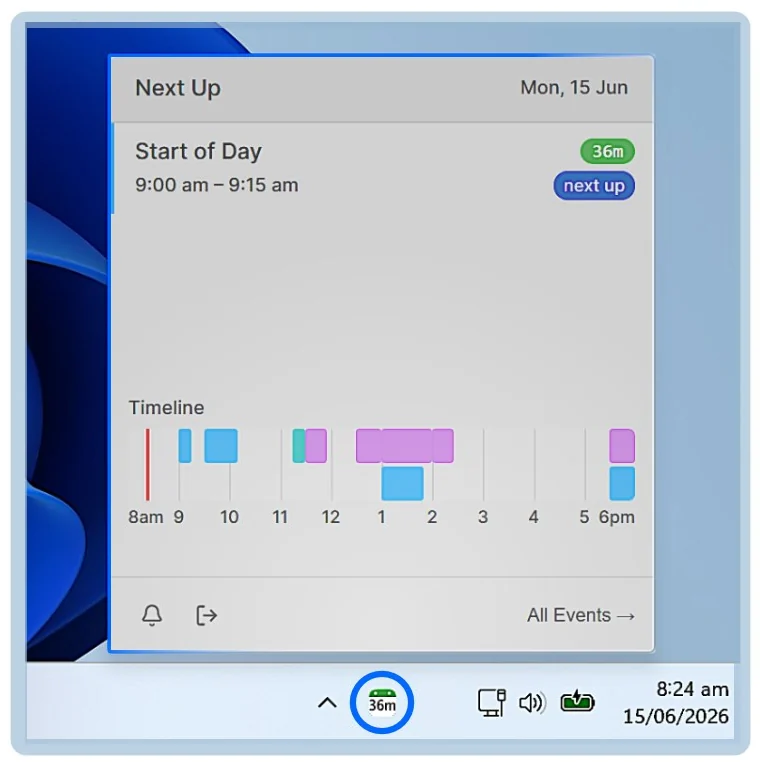
Put the time where you can see it
NextUp Alert is free on the Microsoft Store, for Windows 10 and 11.