
ADHD hyperfocus
ADHD hyperfocus at work, and getting out of it in time
Hyperfocus is the deep, time-erasing absorption many adults with ADHD describe — and at work its most common casualty is the next meeting. Willpower rarely gets you out of it on time. A warning that arrives early, keeps arriving and is hard to miss usually does. Here is why the switch is hard, and a practical way to plan the exit before you go in.
What hyperfocus is
Hyperfocus is not a diagnostic criterion for ADHD and has no single agreed definition, but it is studied. In a 2019 study of more than 600 adults, Hupfeld, Abagis and Shah found that people with more ADHD symptoms reported hyperfocus more often, across school, hobbies and screen time. A 2026 interview study from the University of Glasgow (Bowen & Horlin) summarises that work as describing an intense state of concentration with a sense of timelessness, neglect of personal needs and difficulty switching tasks.
The same Glasgow study found something that matters for meetings: participants could see patterns in when hyperfocus happened, but reported little control over starting or stopping it. It was often triggered by interest in a task, frequently under time pressure. ADDitude’s write-up of the 2019 research puts the everyday version plainly: people lose track of time, and switching to other tasks becomes difficult.
None of this makes hyperfocus a flaw to be fixed. Plenty of people describe it as the state in which they do their best work. The problem is narrower: the calendar does not wait for it to end.
Why hyperfocus and meetings collide
A meeting is a fixed point in time. Hyperfocus is, almost by definition, the state in which you are least aware of time. Put the two together and the familiar pattern follows:
- The reminder lands in the wrong state. A notification at fifteen minutes arrives while your attention is fully elsewhere. It gets dismissed by reflex, and the information goes with it.
- The gap disappears. You surface thinking you have twenty minutes and find you have two.
- The exit takes longer than you planned for. Saving, noting where you were, finding the link and getting your head into a different conversation all take time that was never in the estimate.
- Back-to-back meetings compound it. One late finish pushes into the next start.
Why ADHD transitions are hard
Getting out of hyperfocus is a transition, and transitions come up again and again in ADHD writing. ADDitude’s editors open a reader roundup by saying daily transitions are “rocky, dragged out, and downright frustrating for many adults with ADHD”. The CHADD article on time blindness at work includes “Do you find it difficult to transition from hyperfocused states?” in its self-check.
Task switching is effortful for everyone; the point is not that ADHD makes it impossible, but that you are better off treating the switch as a task in its own right, with time set aside for it, than as something that will happen by itself when the clock says so.
How to get out of hyperfocus before a meeting
These are practical habits, not treatment. Take the ones that fit how you work.
-
Plan the exit before you go in
Before starting deep work, glance at when the next fixed thing is. If there are forty minutes, the plan is thirty-five minutes of work and five of leaving it — not forty of work.
-
Use two warnings, not one
Melissa Orlov, writing in Psychology Today, suggests setting alarms to interrupt hyperfocus: one to wrap up and one to leave. The first is permission to finish the sentence; the second is the instruction to stand up.
-
Make the warning hard to miss
A sound or a voice reaches you when your eyes are locked on a document. Orlov also suggests changing an alarm’s tone regularly so you do not tune it out.
-
Leave yourself a stopping note
One line on what you were about to do next. A lot of the reluctance to stop is the fear of losing the thread; writing it down makes stopping cheaper.
-
Build gaps between meetings
CHADD’s article suggests changing how meetings are scheduled, with breaks between them and shorter durations. Even five minutes between calls gives a transition somewhere to happen.
-
Remove the last-minute scramble
If joining means finding the invite and copying a link, that is one more task competing for the last minute. Have the join link one click away.
How NextUp Alert pulls you out of hyperfocus
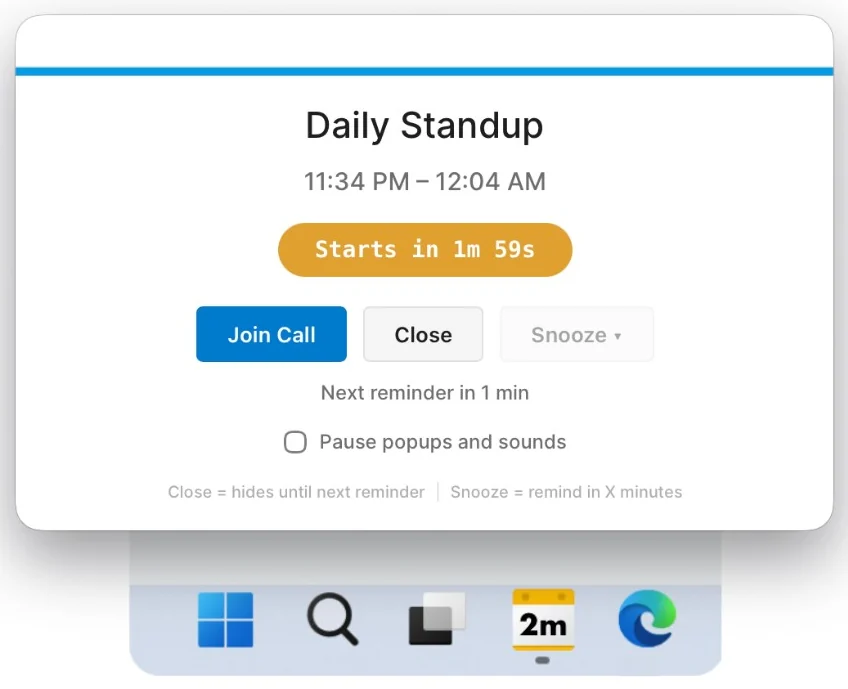
NextUp Alert is a Windows app built around the steps above. It reads your Google or Microsoft calendar and gives you a warning that escalates, instead of one you can miss.
- A taskbar countdown that turns yellow when minutes remain — the cue to stop starting things — and red in the final seconds.
- Up to five reminders before each meeting, so there is a “wrap up” warning and a “go now” warning.
- A spoken countdown — “Event starts in 2 minutes” — that reaches you without you looking up. It is free; AI voices that read the meeting title are a paid extra.
- Pop-ups over every window, including full-screen apps, with a Join button for Teams, Zoom and Google Meet.
- End-of-meeting reminders, so one overrun does not swallow the afternoon.
Not medical advice
This page describes practical workplace habits and a reminder app. It is not medical advice and NextUp Alert is not a treatment. If hyperfocus or ADHD is affecting your work or wellbeing, talk to a qualified professional.
Hyperfocus is often tangled up with time blindness — not feeling the minutes pass at all. If that sounds familiar, the time blindness test measures how far your sense of time drifts, and choosing an ADHD app for time blindness covers what to look for in a tool. To use the taskbar as an always-on clock for your next meeting, see the visual timer for ADHD. And for the habits around it — estimating, planning and stopping on time — see ADHD time management strategies.
Stay in the zone. Still make the meeting.
Free on the Microsoft Store, for Windows 10 and 11.