
ADHD time management tools
ADHD time management tools that put time where you can see it
Good ADHD time management tools answer one question about time so you do not have to work it out in your head: how long until I must stop, how long is left in this block, what does today look like, how long will this take. This page sorts tools by the question they answer, so you can find the gap in your own day and fill only that.
Disclosure: we make NextUp Alert, one of the tools below. Details of the others were checked on their own websites in October 2026.
Why “make time visible” is the common thread
Many adults with ADHD describe time as something they cannot feel passing, and research supports a real difference in how accurately durations are judged (Marx et al., 2021). The tools that help most do not ask you to get better at estimating. They show you the answer. CHADD’s article on time blindness at work lists exactly these: visual timers, visual schedules, time blocking and alerts for meetings.
This page is narrowly about time. For tools that help with tasks and focus as well, see the broader ADHD tools for adults roundup. And none of this is medical advice; for ADHD itself, talk to a qualified professional.
Six time questions, and the tools that answer them
-
“How long until I have to stop?”
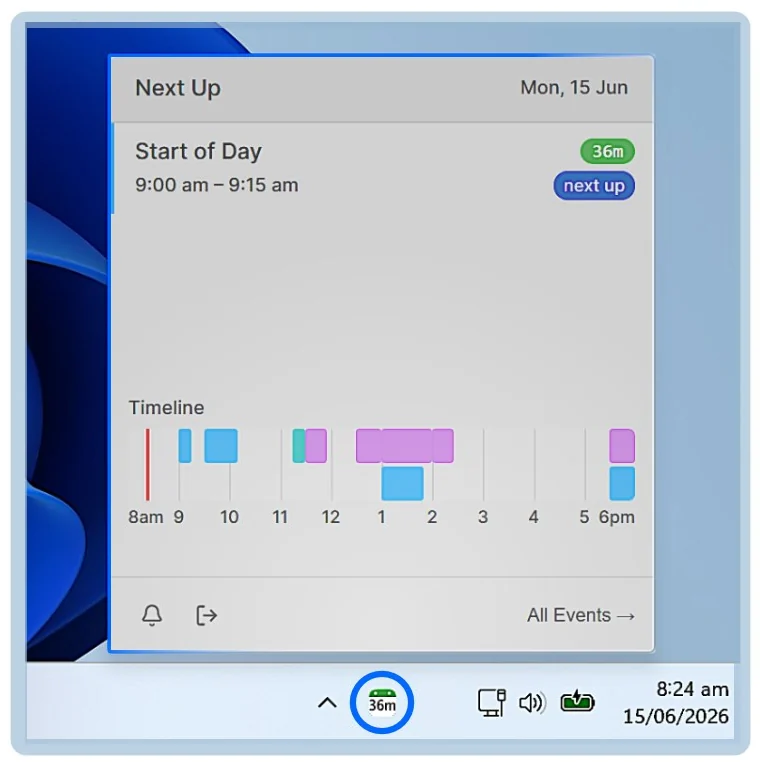
A countdown to your next fixed commitment. Calendar reminders give you one notification; NextUp Alert keeps a live countdown to the next meeting in the Windows taskbar, green to yellow to red. This is the question that matters most on a meeting-heavy day.
-
“How much is left of this block?”
A visual timer you set yourself. The Time Timer shows it as a red disk that disappears; Windows has a session timer built into Focus in the Clock app.
-
“What does today look like?”
A visual timeline rather than a list. Tiimo and Structured both lay the day out as a timeline and can import your calendar. NextUp Alert’s tray pop-out shows your meetings on a colour-coded timeline too.
-
“How long will this take?”
A second opinion on your estimate. Goblin Tools has an Estimator that guesses an activity’s timeframe, free on the web. Treat it as a sanity check, not an answer.
-
“How long did that actually take?”
A time log. It can be a note on your desk or a spreadsheet: write down how long recurring tasks really took, for a week. CHADD lists logging task time among its strategies, and it corrects estimates better than any app.
-
“When do I need to start wrapping up?”
Layered warnings. One alert to finish the thought, one to go. In NextUp Alert you can set up to five before a meeting and five before it ends, so overrunning one call does not make you late for the next.
ADHD time management tools at a glance
| Tool | Answers | Where it runs | Starts itself? |
|---|---|---|---|
| NextUp Alert (ours) | How long until the next meeting; when to wrap up | Windows 10 and 11 | Yes, from your calendar |
| Time Timer | How much is left of this block | Physical; iOS and Android app | No |
| Windows Focus | How much is left of this block | Built into Windows | No |
| Tiimo | What today looks like | iOS, Android, Apple Watch, web | Shows imported calendar events |
| Structured | What today looks like | iPhone, Apple Watch, web | Shows imported calendar events |
| Goblin Tools Estimator | How long will this take | Web; iOS and Android apps | No |
“Starts itself” is the column to weigh most. A tool you have to remember to open fails on the busy, distracted days when you need it.
A Windows tool for the first question
Most ADHD time management tools are phone apps. If you spend the day at a Windows PC, the question that bites hardest — how long until the next meeting — is best answered on the PC itself.
- A taskbar countdown to your next event, always visible
- Colour thresholds you set, so yellow arrives as early as you need
- A spoken countdown — “Event starts in 2 minutes” — free
- Connects the Google or Microsoft account your meetings live in
- Runs in the system tray, with no browser tab or Outlook window open
Two tools are usually enough
Pick the question you get wrong most often and answer that first. For most office days the useful pair is one tool for the block you are in (a visual timer) and one for the edge of it (a countdown to the next meeting). Add a planner only if you also lose track of what the day holds.
Watch for tools that work against each other. Windows Focus turns on Do Not Disturb, so a meeting reminder that arrives as an ordinary Windows notification can be silenced mid-session. Make sure the thing that tells you to stop is still able to reach you.
The habits matter as much as the tools: see ADHD time management strategies for those. If you are still deciding whether an app is worth it at all, choosing an ADHD app for time blindness sets out what to look for, and the time blindness test gives you a baseline first.
Answer “how long have I got?” at a glance
NextUp Alert is free on the Microsoft Store, for Windows 10 and 11.