
ADHD tools for adults
ADHD tools for adults, sorted by the problem they solve
The most useful ADHD tools for adults are the ones aimed at a specific friction: seeing time, breaking down tasks, staying focused, or making it to meetings. This roundup groups real tools — apps, built-in Windows features and a few low-tech ones — by which of those four problems they help with, so you can pick one per problem instead of installing everything at once.
Disclosure: we make NextUp Alert, which appears in the time and meetings sections. Facts about other tools come from their own websites, checked in October 2026; none of them paid to be here.
Before you pick: one problem at a time
It is easy to download a new productivity app, use it hard for a week and quietly abandon it. A tool tends to stick when it solves one problem you can name. Start with the one that costs you most at work — usually either losing track of time or not being able to start — and add a second only once the first has become automatic.
Not sure whether time is your main problem? The time blindness test measures how far your sense of time drifts in a few minutes.
None of these tools is a treatment, and this page is not medical advice. For ADHD itself, talk to a qualified professional.
ADHD tools for seeing time
For when the problem is not knowing how long you have.
Time Timer
A visual timer whose red disk disappears as time elapses. Physical desk timers, plus an app for iOS and Android. Good for timing a block you choose.
Tiimo
A visual planner built with ADHD and autism in mind: a timeline of your day and a focus timer. iOS, Android, Apple Watch and web, with a free version.
NextUp Alert (ours)
A countdown to your next calendar event in the Windows taskbar, green to yellow to red. Starts itself from your calendar. Windows only.
An analogue clock in your eyeline
Unglamorous and still useful: the hands show a duration as a slice of the face, which a digital readout does not.
We go deeper on this category in visual timers for ADHD.
ADHD tools for tasks
For when the problem is starting, or remembering what is next.
Goblin Tools
A set of small tools “for when things feel too big or complicated”. Magic ToDo breaks a task into steps; Estimator guesses how long something will take. Free on the web; the mobile apps are a one-off purchase.
Todoist
A to-do list with due dates and reminders, on phone, desktop and the web, with a free plan for personal use. Good for getting tasks out of your head.
ADHD focus tools
For when the problem is staying on one thing.
Windows Focus
Built into the Windows Clock app: a session timer that turns on Do Not Disturb and stops taskbar apps flashing. Free, nothing to install.
Forest
A focus timer that grows a virtual tree while you stay off your phone. iOS, Android, and Chrome and Firefox extensions, with a free tier.
Focusmate
Body doubling over video: you are paired with another person for a 25, 50 or 75 minute session. Free for three sessions a week.
A focus timer and a meeting reminder can work against each other: Windows Focus silences notifications, so a reminder that arrives as a Windows notification may not reach you mid-session. Pair a focus tool with something that stays visible.
ADHD tools for meetings
The category most ADHD app lists skip, because most of them are about phones — and for many adults the costliest misses at work are meetings.
- Your calendar’s own reminders. Free and already there, but usually one notification that is easy to dismiss. If they are not appearing at all, see the fixes for Outlook reminders and Teams reminders.
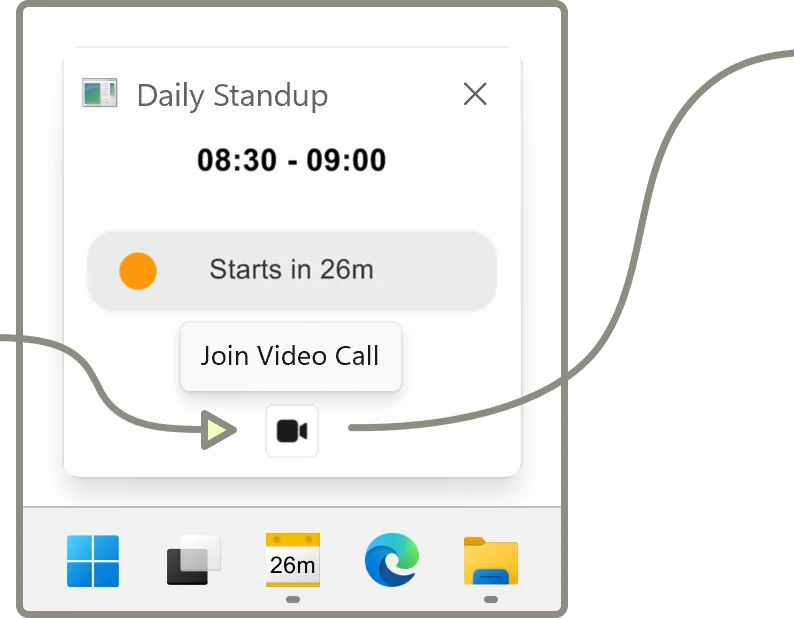
- NextUp Alert. A Windows app that reads your Google or Microsoft calendar and adds a live taskbar countdown, pop-ups over every window, a spoken countdown and a one-click Join button for Teams, Zoom and Google Meet. Free; AI extras are paid.
- Gaps between meetings. Not a tool, but CHADD suggests scheduling breaks between meetings, and it costs nothing.
Low-tech ADHD tools worth keeping
Readers in an ADDitude roundup on daily transitions describe some refreshingly simple ones:
- A large wall calendar by the front door, so the day’s plan is the last thing you see before leaving.
- Photographing the whiteboard to-do list before heading out, so it comes with you.
- Closing the laptop as soon as a video call ends, as a physical full stop.
ADHD tools at work and workplace accommodations
If tools are part of a conversation with your employer, the Job Accommodation Network lists “assistive technology (timers, apps, calendars, etc)” among accommodation ideas for time management. That is a starting point, not legal advice; JAN itself is the place to ask about your situation. There is more on this in ADHD at work.
How we chose these
Every tool here is one we could check on its maker’s own website: what it does, where it runs and whether there is a free way in. We left out tools whose details we could not confirm, and we have not listed prices, because they change more often than this page will. There are many good ADHD apps that are not on this list; it is a starting point sorted by problem, not a ranking.
Narrowing it down
If time is the main problem, two pages go further: choosing an ADHD app for time blindness sets out what to look for and compares the options, and ADHD time management strategies covers the habits that make any tool work better. For time tools only, sorted by the question each answers, see ADHD time management tools.
The meeting tool most ADHD lists leave out
NextUp Alert is free on the Microsoft Store, for Windows 10 and 11.