
Google Calendar on Windows
Is there a Google Calendar desktop app for Windows?
Not an official one — Google has never shipped a Windows app for Calendar. There are four honest ways to get your calendar onto the desktop, and the right one depends on what you actually want: a window to manage events in, or the certainty of never missing one.
The four ways to get Google Calendar on the Windows desktop
1. Pin a browser tab
Zero setup, and where most people end up. The catch: reminders live and die with that tab. Close it to focus — or sign into the wrong profile — and nothing fires.
2. Install it as an app (PWA)
Chrome and Edge can install calendar.google.com as an app of its own, with its own window and taskbar icon. The closest thing to an official app — but it is still the browser underneath, and its notifications are still browser notifications.
3. New Outlook with a Google account
Windows’ built-in Mail & Calendar app was retired at the end of 2024. Its replacement, the new Outlook, can add a Google account and show that calendar — a full desktop client, though its reminder window is easy to miss. We wrote a fix guide about exactly that.
4. A third-party calendar client
The Microsoft Store has full calendar apps that sync a Google account. Worth it if what you want is a different place to plan your week.
All four give you somewhere to look. None of them changes what happens when you are not looking — which is when meetings get missed.
If the app you want is really “never miss anything”
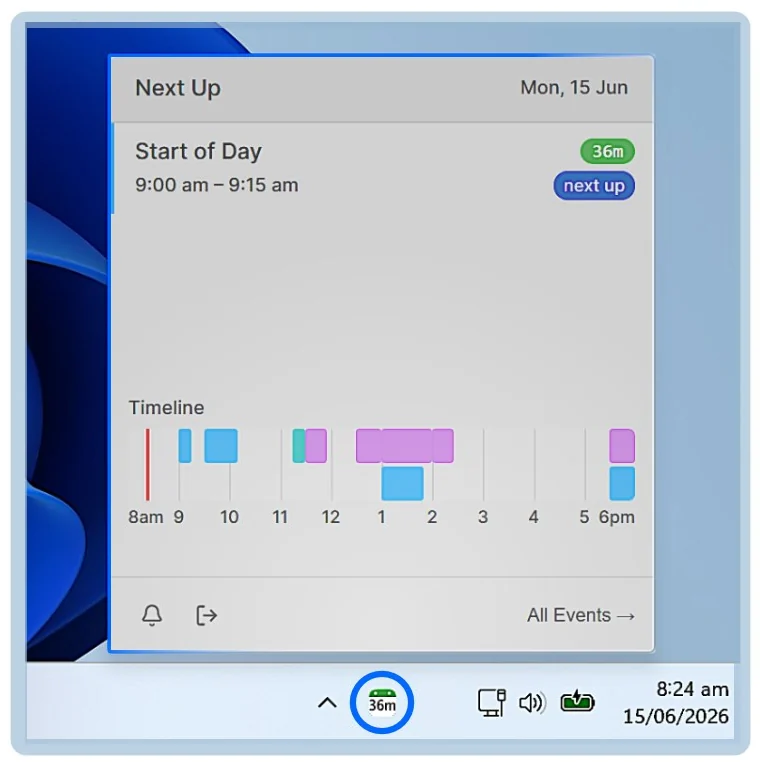
NextUp Alert is the other half of the desktop-app wish. It is not a calendar you type into — it reads your Google Calendar and puts what is next where you cannot miss it, starting with the taskbar itself.
- A live taskbar countdown to your next event — green, yellow, then red
- A system tray pop-out with the whole day on a timeline
- Pop-up reminders that overlay every window and stay until you act
- Spoken countdowns — “Event starts in 2 minutes”
- One click into Google Meet, from the popup or a keyboard shortcut
- Runs from the system tray with every browser window closed, and synced events keep firing offline
It asks for read access only and writes nothing back, so it runs happily beside a pinned tab, the PWA, the new Outlook or any client from the Store. Keep managing events wherever you like — NextUp Alert makes sure you show up. How it connects to Google Calendar →
Common questions
Does Google make an official Google Calendar app for Windows?
No — there has never been one for Windows. The closest official route is installing calendar.google.com as an app from Chrome or Edge, which gives it its own window and taskbar icon but still runs inside the browser.
What happened to the Windows Calendar app?
Microsoft retired the built-in Mail & Calendar app at the end of 2024. Its replacement, the new Outlook for Windows, can add a Google account and display that calendar alongside Microsoft ones.
Can NextUp Alert replace Google Calendar?
No, and it does not try to. It has read access only, so you keep creating and editing events in Google Calendar itself. What it replaces is the need to keep a calendar window open to be reminded — the taskbar countdown, pop-ups, spoken countdowns and one-click join all run from the system tray.
Do the reminders work when the browser is closed?
Yes. NextUp Alert is a Windows desktop app that talks to Google’s calendar service directly, so no browser, tab or extension needs to be open. Events that have already synced keep triggering reminders even if your connection drops.
Put your Google Calendar in the taskbar
Free on the Microsoft Store. Read-only, and runs beside whichever option you picked above.