
ADHD and being late
ADHD and always being late: why it happens and what helps
If you have ADHD and are always late, it is rarely because you do not care. Many people describe the same few patterns: an estimate that is too optimistic, “one more thing” before leaving, and no time set aside for the switch itself. What helps is moving the warning earlier and making it visible — aiming at the moment you need to start leaving, not the moment the thing begins.
Why people with ADHD are often late
Lateness is one of the most visible effects of difficulty judging time. A 2021 meta-analysis found people with ADHD were, on average, less accurate at reproducing durations (Marx et al.), and an occupational therapist writing for CHADD names punctuality among the things time blindness can affect. The same article notes that many adults with ADHD tie their self-worth to how well they manage time, and feel shame when they fall short.
That shame does not get anyone anywhere on time. Treat lateness as a practical problem with practical causes, and it gets much easier to work on. If you want a number for how far your own sense of time drifts, the time blindness test takes a few minutes and is not a diagnosis.
This page is practical, not medical advice. If ADHD is affecting your work or relationships, talk to a qualified professional.
The patterns behind “always late”
- The optimistic estimate. The drive “takes fifteen minutes” because it once did, at 6am, with every light green.
- One more thing. There is time to answer one email before the call. Then there is not.
- The invisible transition. Saving, packing up, finding the keys or the meeting link all take time that was never in the plan.
- Aiming at the start time. The reminder says the meeting is at ten, but the moment that mattered was 9:50, when you needed to start wrapping up.
- The overrun. The previous meeting, or the previous task, finishes late, and everything after it slides.
What helps when you are always late
-
Time it once, then add a buffer
Melissa Orlov’s advice in Psychology Today: time the routine instead of guessing, then add a 10–20 percent fudge factor.
-
Set the reminder for when to leave
Work backwards from the start time and put the warning at the moment you need to start moving. That is the only time the reminder can change anything.
-
Use two alarms: wrap up, then go
Orlov suggests one alarm to finish what you are doing and a second to leave. The first gives you a gradient instead of a cliff.
-
Make time visible while you wait
“I have loads of time” is an estimate. A countdown you can see is not. Keep the time remaining somewhere your eyes already are.
-
Remove the last-minute friction
Keys by the door, bag packed the night before, the meeting link ready to click. Every small search eats into a margin that was thin to start with.
-
Borrow someone else’s clock
Orlov also describes asking a partner to check in if you have not left by a set time. A colleague can do the same for a meeting you cannot miss.
Being late to online meetings
Online meetings have their own version of lateness: you are at the desk the whole time and still join three minutes in. It is almost always one of two things — the warning came too late or was missed, or the last minute went on finding the link.
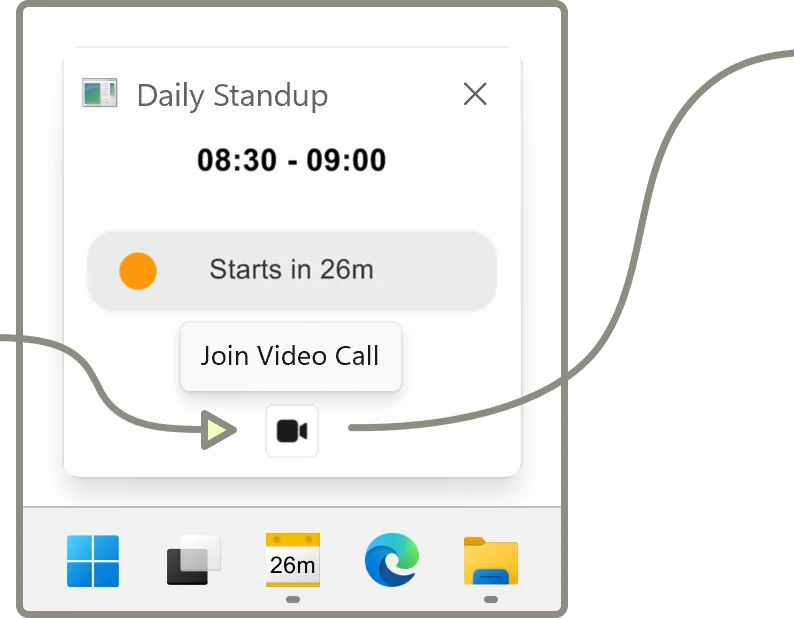
That is the problem we built NextUp Alert to solve. It is a Windows app that reads your Google or Microsoft calendar and:
- Keeps a live countdown to the next meeting in the taskbar, turning yellow when it is time to wrap up and red when it is time to go
- Lets you stack up to five reminders, so “wrap up” and “go now” are separate warnings
- Announces the countdown out loud — “Event starts in 2 minutes” — for free
- Puts a Join button for Teams, Zoom and Google Meet in the pop-up, and opens the link from anywhere with Ctrl+Alt+M
- Reminds you before a meeting ends, so one overrun does not make you late for the next
ADHD and being late to work
Getting out of the house in the morning is a different problem, and to be clear, NextUp Alert cannot help with it: it runs on your Windows PC, not your phone. For the morning, the same principles apply with different tools — time the routine, set a phone alarm for the leave time rather than the start time, and put the things you need by the door. Readers in an ADDitude roundup on transitions describe staggering several alarms across the morning and keeping a large calendar by the front door.
If lateness is causing trouble with an employer, there are structural options too, from flexible hours to clearer expectations. See ADHD at work for those, including a factual note on workplace accommodations.
When you are late anyway
You will be, sometimes. A short, early message — “running five minutes late, start without me” — costs far less than an elaborate apology afterwards, and it takes the pressure off the rest of the journey. You do not owe anyone a diagnosis to explain it.
For the wider set of habits, see ADHD time management strategies, and if the real problem is getting out of deep work in time, read getting out of hyperfocus before a meeting.
Get the warning while it can still help
NextUp Alert is free on the Microsoft Store, for Windows 10 and 11.