
ADHD at work
ADHD at work: a practical guide for meeting-heavy days
For many adults, ADHD at work shows up less as “cannot focus” and more as friction around time: turning up to meetings, finishing before deadlines, stopping one thing to start the next. The fixes that help tend to be practical — change the tools, change the structure of the day, and, where it makes sense, ask for support. This guide covers all three, with the office and working from home in mind.
Where ADHD tends to show up at work
An occupational therapist writing for CHADD lists the areas time blindness can affect: punctuality, deadlines, routines. The same article points out the other side — that hyperfocus, adaptability and problem-solving can be real strengths in the right role — and that the shame many adults attach to time problems is part of the cost.
In practice, the patterns people describe at a desk job are familiar:
- Being caught out by a meeting you knew about all morning.
- Losing an afternoon to one absorbing task while the urgent one waits.
- Underestimating how long something will take, consistently.
- Overrunning one call and arriving late, flustered, to the next.
None of that is a character flaw, and none of it is solved by trying harder. It is mostly solved by moving time out of your head and onto something you can see. If you want a measure of how far your own sense of time drifts, the time blindness test takes a few minutes.
This page is about workplace habits and tools. It is not medical or legal advice; for ADHD itself, talk to a qualified professional.
Meetings: the fixed points in the day
Meetings are where time problems become visible to other people, which is why they are worth fixing first.
See the next one at all times
A countdown you can read from the corner of your eye beats a notification you have to catch. Put it somewhere nothing covers.
Warn early, then warn again
One alert to wrap up, one to go. A single fifteen-minute reminder is easy to dismiss and forget.
Leave gaps between calls
CHADD suggests changing how meetings are scheduled: breaks in between and shorter durations. Five minutes is enough for a transition to happen.
Make joining instant
Hunting through an invite for the link is a classic way to be two minutes late to an online meeting. Keep it one click away.
If you are the one who is always a few minutes behind, there is a whole page on ADHD and being late.
Deadlines and long projects
Long projects are hard for the opposite reason to meetings: there is no fixed point until the deadline, so nothing feels urgent until everything is. What helps is creating fixed points of your own.
- Break it into steps with dates. CHADD lists splitting large projects into steps among its strategies; tools such as Goblin Tools’ Magic ToDo can do the first pass for you.
- Put the steps on the calendar. A block called “draft section two” at 10am is a commitment; a to-do item is a wish.
- Ask for clearer due dates and check-ins. Both appear on CHADD’s list of supports to ask your employer for, and neither needs a formal process.
ADHD and working from home
Working from home removes the accidental time cues an office provides — colleagues heading to the meeting room, the lunch rush, people leaving. The day has fewer edges, and it is easier to look up at four o’clock wondering where it went. Some things that help:
- Replace the office cues on purpose. A visible countdown to the next call, a timer for focus blocks, a fixed end to the day.
- Body doubling. Working alongside someone on video — informally, or through a service such as Focusmate — gives the day some external structure. CHADD lists it among strategies for time blindness at work.
- Close the call physically. One reader in an ADDitude roundup on transitions closes the laptop as soon as a Zoom call ends, as a clear full stop.
ADHD productivity without the hours myth
ADHD productivity advice often amounts to “work longer”. CHADD’s article suggests something more useful: where you can, measure results rather than hours, and fit your hours to the time of day you are most alert. Protect your best hours for the work that needs them, and let meetings cluster in the rest.
ADHD workplace accommodations
CHADD’s article sets out a useful ladder it calls the Four As: adapt (learn strategies and tools), adjust (change the structure of the job or your day), ask (informal requests to your employer) and accommodate (a formal process, usually with a healthcare provider). Most people start at the top.
For the formal end, the US Job Accommodation Network lists accommodation ideas for ADHD. Under time management they include to-do lists, meetings to discuss expectations, help with prioritisation and “assistive technology (timers, apps, calendars, etc)”; under memory, reminders and written instructions.
Whether to disclose, and what you are entitled to, depends on where you work and your circumstances. We are not giving legal advice; JAN, your HR team or an employment adviser are the places to ask.
Where NextUp Alert fits at work
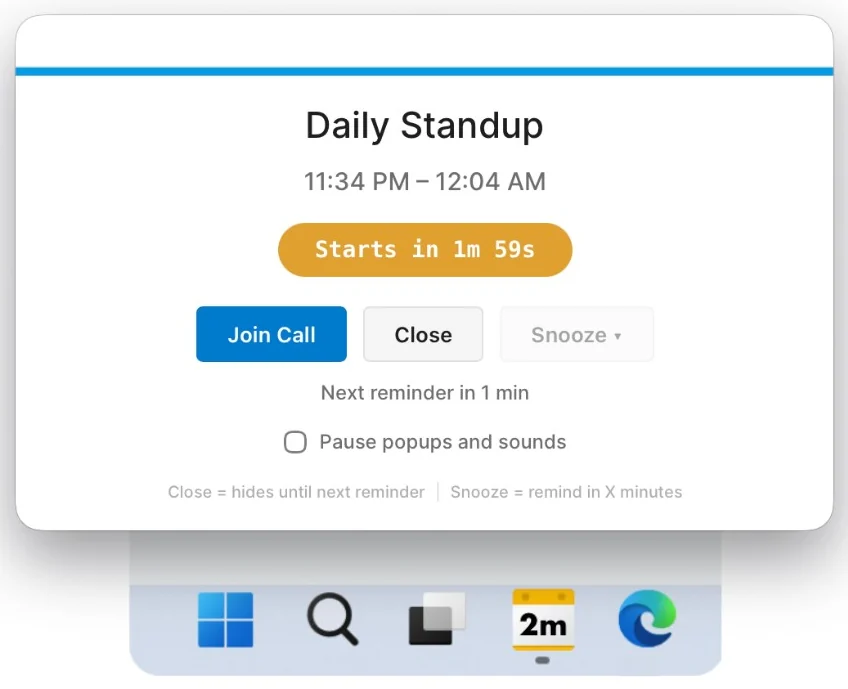
We make NextUp Alert, a Windows app aimed squarely at the meetings part of this page. It reads the Google or Microsoft account your meetings live in and handles the “see it, warn early, join fast” steps.
- A live countdown to the next meeting in the taskbar, green to yellow to red
- Up to five reminders before each meeting, and five before it ends
- Pop-ups over every window and a free spoken countdown
- One-click join for Teams, Zoom and Google Meet
- Runs from the system tray, with Outlook and the browser closed
It does not manage tasks or deadlines. For those, see ADHD tools for adults.
More on the habits behind all this in ADHD time management strategies and getting out of hyperfocus before a meeting.
Make the next meeting impossible to lose track of
NextUp Alert is free on the Microsoft Store, for Windows 10 and 11.